

Our fundraising portal has a ton of great tools to help you fundraise and learn about our cause.
Fundraising Portal Tips and Tutorials
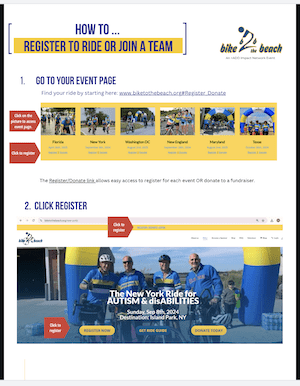
How to Register
How to Register (and Join a Team)
(The PDF)
Fundraising Portal Tour
How to Use Your Portal and Our Fundraising Tools
(The Video)
(The PDF)

Downloading the Summa App
How to download and sync our fundraising app
Fundraise on the go with our Mobile Fundraising App.
Customizing Your Page
Personal Pages
Customized pages do better. You can change your profile picture, create a photo gallery, customize your page URL, and much, much more!
Fundraising Tutorials
How to Send an Email
Emailing your friends and family and past donors is one of the best ways to fundraise.
How to enter check donations on the website.
Its is easy to enter check donations onto the site AND have them processed directly by Bike to the Beach, online!.
How to share your page link!
The best way to fundraise is to share the link to your fundraising portal in email, social media … everywhere! This is how to do it!
Updating Registration Information
How to add bus and make other registration changes
You can edit your personal information and preferences OR request a change your registration (bus, distance, mailing, etc.) in the fundraising portal.
How to access GPS Navigation
How to access Ride With GPS route on Mobile
Riders can navigate the entire route on their cell phones with turn-by-turn directions and voice navigation. Say goodbye to the stress of missing a turn.